
|
|

The scene organizer is a rough organizational tool for playing around with scenes (or any other info). Click the scene organizer button on the project toolbar.
The organizer builds upon the bookmarks that Worgan has always had. A bookmark is any text in the notecard of the form: **bookmark**. Any text under this becomes part of a outline folder.
For Example:
You have the following text in a project card:
**bookmark#1**
item 1
item 2
**bookmark#2**
some stuff
***bookmark#3***
more stuff
When converted to outline format it will appear like so:
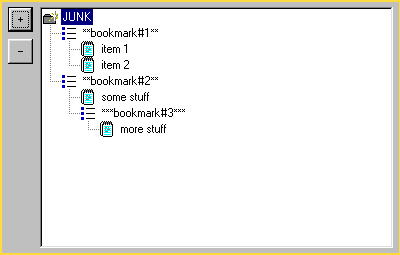
The buttons to to the left (+, -) are used to expand and collapse the scene tree. The tree nodes (the little books) each represent a line of text in the project card. These nodes can be dragged around. It is best to avoid too many blank lines in a project card, because it creates problems.
Below, when I say parents, I mean outline icons, and when I say children I mean notepads.
There are some rules (the scene organizer is still being refined). You cannot drag a parent as a child (i.e., reverse who is the parent and who is the child in the tree). You must do this the long way, first drag the child to the same level as the parent and then drag the parent under the child.
To save your changes click OK. Note you that if you drag text around any special formating (like bold face) will be lost. You'll be left with a plain text version of your original card. Select cancel to ignore the changes.
The long button along the side of the text portion of the scene organizer is for modifying the entries manually. Click the button and any text changes that you have made will become updated in the tree view.
Some of the dragging does not work great, so check your work out carefully before committing any changes. I'm trying to improve this tool so it is more intuitivie.