
|
|
Do NOT uninstall or remove your previous Worgan version. Keep it around so you can convert the old date to the new format. Also you should keep it installed for 2-3 weeks in case the new version of Worgan behaves incorrectly. You should also backup all Worgan data before installing the new version.
You should see the following screen the first time you run Worgan.
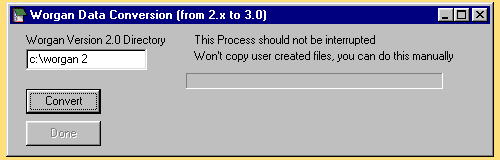
If you don't and you have a previously installed version of Worgan, close Worgan and contact me immediately.
Click on the convert button and the conversion process will begin. It will convert and or copy every file in your Worgan directory that Worgan uses to run(including submission databases, markets, notes). It will NOT copy world-building files or any new directories that you have created. You have to copy these manually.
When conversion is finished you will see a little message and the done button will appear. Click it and the conversion screen will close.
If you see error messages, record them and report them to me. There are a couple no-big-deal error messages which just mean that you haven't created a file that Worgan expects to find. Record the EXACT error message.
All previous owners of Worgan can upgrade to this version.
If Worgan 3 runs smoothly for a couple weeks then you can uninstall the old Worgan 2. Contact me if you have any questions/concerns at all.