
|
|
The focus is a primary component of Worgan 2. Iow ideas can be organized by multiple foci. A science fiction story set in your imaginary universe of Ug, might have two foci associated with it: science-fiction and Ug.
The focus list for a card is easily modified. Click a blank spot on the Character Toolbar or the Project Toolbar, or click Focus on the Header. Or go to Cards|Card Properties on the file menu.
The focus is used in relation with the Notebook, Project Management, and Markets. They all share some general properties:
Changes to this list modify the main Foci list. To add a new focus, type the desired focus and hit enter or the Add to Master Focus List. To delete a focus select the desired focus in the Foci List and click enter. As you use Worgan, you will likely modify this master list a great deal. You can always restore the default list shipped with Worgan, by clicking on Restore Default List.
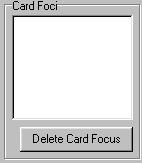
This region of the screen, represents the current foci associated with the viewed card. Right now, it is empty. To add foci click on the Foci List, your master list of available foci, and drag and drop the foci into the Card Foci.
Click OK on the Card Properties form and you will see the focus on the header bar of Notebook. You can add up to 255 characters worth of foci to this list.
See Also
Focus Tutorial