
|
|

You can design your own calendars.
To get a feel for what the calendar manager can do, load the default.cal by going to File|Open. Save this file under a new name and experiment with it. Basically it is up to you to define a list of months and a list of days.
There are five basic steps to take when designing a calendar:
1. Choose a Name for the Calendar
2. Choose the Number of Months
3. Add a month name for each month. Type the name in the edit box above Add Month and click this button. You will be able to add as many months as you specified being available.
4. Once you've named all your months click on the first month. In the next group-box choose the number of days in this month. You can also specify a special rule.
Special Rules these are rules that go against the standard workings of the calendar system. An example of one such rule is the use of the leap year in our own calendars. Click on february in the default calendar to see an example of this (see Figure 1).
Figure 1: February's Special Rule
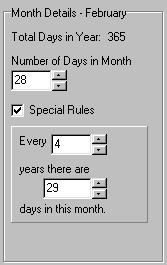
You will notice that the Special Rule check-box is selected. Every 4 years there are 29 days in this month.
Another example file included is nugelian.cal.
Exit with Verification performs an analysis of your calendar and won't let you leave until all the month and day names have been filled in. If you find this annoying simply Exit without Verification.
See Also
Timelines